
LG Mini Split Error Codes Reference for Common Symptoms
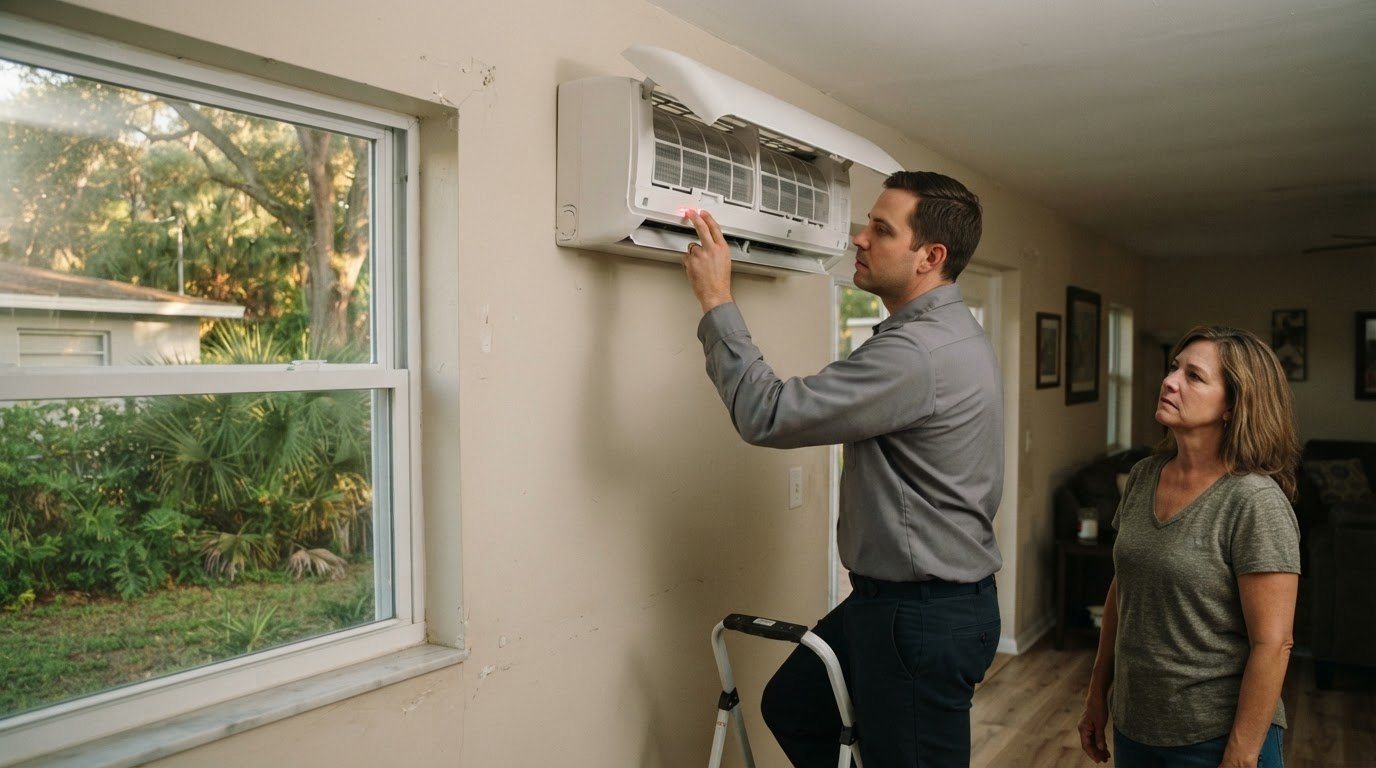
A recurring LG mini split code can point to an indoor-outdoor communication fault, a drainage problem, or an issue with the inverter compressor or its controls. Troubleshooting LG mini split error codes starts with identifying the exact code or LED blink pattern; after a reset, wait 5 minutes before restoring power. If the same code returns, it needs more than another reset.
An LG mini split error code can look alarming, especially if the system stops running. Treat it as a diagnostic clue, not a complete repair instruction. The meaning can vary by model, so note how the display or indicator lights behave to help narrow down the issue.
This guide to troubleshooting LG mini split error codes explains common code types, indoor-unit blink patterns, and what communication, drainage, and inverter faults may indicate. It also helps you recognize when a fault persists and a qualified technician should diagnose the system.
Key Takeaways
- Communication codes such as CH05, E0, and CH53 can help narrow the issue to the connection between indoor and outdoor units.
- CH04 points to a drainage or condensate concern, while CH07 can indicate conflicting operating modes.
- Read the LED blink pattern as a code, and record a video if the repeating sequence is difficult to follow.
- Inverter codes can indicate problems with voltage, current, the compressor, or outdoor-unit controls.
- If a fault returns or the system keeps stopping, the code gives a technician a useful starting point for diagnosis.
CH05, E0, and CH53 indoor-outdoor communication errors
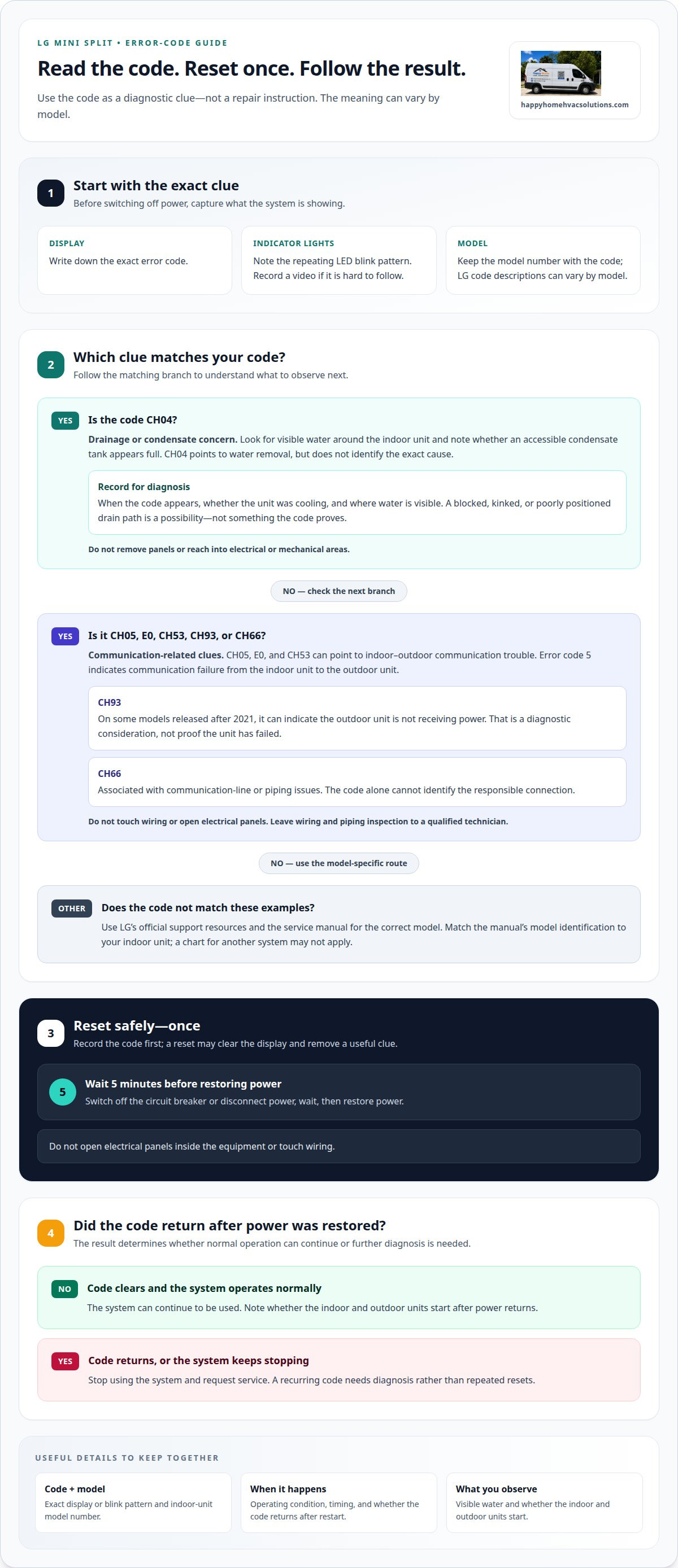
CH05, E0, and CH53 can indicate a communication problem between an LG indoor unit and its outdoor unit. Safe first steps are to note the displayed code, switch off power, and restore it after the reset interval.
Indoor-to-Outdoor Communication Errors
Indoor-to-outdoor communication errors mean the indoor unit and outdoor unit aren’t exchanging signals correctly. On LG single- and multi-split air conditioners, error code 5 indicates communication failure from the indoor unit to the outdoor unit.
CH05 and E0 may also point to a communication fault, while CH53 identifies a communication error. The code identifies the general fault category, not the failed wire or component. For example, a recurring CH53 after restoring power needs further diagnosis rather than repeated resets.
CH93 and CH66 Communication Clues
CH93 can indicate that an LG outdoor unit isn’t receiving power on some models released after 2021. This makes the outdoor unit’s power supply a relevant diagnostic consideration, not proof that the unit itself has failed.
CH66 is associated with communication-line or piping issues. A code alone can’t establish which connection is responsible. Because these faults may involve wiring or refrigerant piping, leave inspection and repair to a qualified technician rather than opening the unit or handling connections.
Communication Troubleshooting and Reset Steps
A basic reset involves disconnecting power, waiting, then restoring power. Record the exact code first, since a reset may clear the display and erase a useful clue.
For an LG air conditioner showing an error, switch off its circuit breaker or disconnect power for 5 minutes, then restore power. With CH53, the breaker can be reset about 5 minutes after power is turned off or the breaker trips. Don’t touch wiring or open electrical panels inside the equipment.
How to Reset After an Error Code
To reset an LG mini split, switch off its circuit breaker or disconnect power, wait 5 minutes, then restore power. If the code disappears and the system operates normally, it can continue to be used.
If CH05, E0, CH53, or another error returns, stop using the system and request service. A code that clears once may reflect a temporary power or communication issue; a repeated code needs diagnosis. Note whether the indoor and outdoor units start after power returns.
Official Error Charts and Service Manuals
An error chart lists code meanings, while a model-specific service manual provides diagnostic details for that unit. Use LG’s official support resources and the model number on your equipment to find documents for the correct system.
Match the manual’s model identification to your indoor unit before relying on its code descriptions. LG mini splits vary by model, so a chart for another system may not apply. Keep the model number and recorded code together when arranging service.
CH04 drainage and condensate issues
CH04 is an LG air-conditioner drainage error involving the indoor-unit drain or an overly full condensate tank. The code points toward water removal, but doesn’t identify the exact cause by itself. A visible leak, standing water, or a tank that needs emptying can help describe what’s happening. Record the code and note where water appears before arranging diagnosis.
Condensate is moisture collected as an air conditioner cools indoor air. The system must move that water away from the unit. If drainage is restricted, water may collect instead of flowing out. With CH04, the key distinction is whether the issue involves the indoor drain path or a condensate tank reaching capacity. The same code can therefore call for different checks.
When troubleshooting LG mini split error codes, start by observing the system, not taking it apart. Look for water around the indoor unit and note whether the error appears while it runs. If the unit has an accessible condensate tank, check whether it appears full and follow the model’s instructions to empty it. Don’t remove panels or reach into electrical or mechanical areas to investigate a drain fault.
A blocked, kinked, or poorly positioned drain path can interfere with water removal. These are possibilities to assess, not conclusions that CH04 proves. A technician can inspect the drain route, tank, and drainage operation to find where water is backing up. The code and the location of visible water help focus that assessment.
Keep a simple record to clarify the symptom: note when CH04 appears, whether the unit was cooling, and whether water is visible. For example, “CH04 appeared during cooling, with water beneath the indoor unit” gives more useful context than the code alone. Note whether the symptom returns after restarting the unit, but don’t keep resetting a recurring fault.
Don’t assume that every LG air conditioner uses the same drain arrangement. A mini split’s indoor-unit drain path differs from a window or portable unit’s setup. LG specifies an 18 mm diameter drain hose for draining condensate from a window or portable air conditioner; that specification isn’t a mini-split requirement.
If CH04 appears without visible leakage, the code still indicates a drainage concern. An overly full condensate tank may trigger it, even when water hasn’t spilled onto the floor. If the error persists or the indoor unit continues to stop, arrange a professional inspection rather than attempting internal repairs. A technician can determine whether the drain, tank, or another drainage component needs attention.
For troubleshooting LG mini split error codes with recurring CH04 symptoms, mini-split service can help assess the drainage system and identify the source. Share the exact code, when it appears, and any visible water. Those details connect the display to the symptom and help guide the next diagnostic steps.
CH07 conflicting operating modes
CH07 indicates conflicting operating modes among indoor units connected to an LG multi-split system. The conflict can occur when one unit requests heating while another requests cooling. Because the outdoor unit serves connected indoor units, incompatible commands can prevent normal operation. The code points to a mode mismatch, rather than identifying a failed component. Start by noting which indoor units display CH07 and their selected modes.
Compare the operating settings across the affected units. For example, an indoor unit set to heat may conflict with another set to cool. Change the settings so the units request compatible operation, then observe whether CH07 clears. Avoid assuming that changing one remote control resolves every case; another connected unit may still be requesting a different mode.
Operating mode and temperature setting are different. Heating and cooling are separate modes; the selected temperature sets the target within a mode. If two units request cooling at different temperatures, that is not the same conflict as one requesting heat. Check the mode labels on each controller, not just the displayed temperatures.
Record which room or indoor unit is affected, what each controller shows, and whether the code appears immediately or after a mode change. A clear example is: “The living-room unit was set to cooling, while the bedroom unit showed heating.” This gives a technician useful context if CH07 remains after settings are aligned. Don’t erase the clue by recording only “unit not working.”
On a multi-split system, check the mode on every connected indoor unit you can control. A unit in another room may be set to a different mode, even if the affected unit’s remote appears correct. Align the modes before testing operation again. If a controller’s display is unclear, note its icons rather than guessing what the setting means.
CH07 that clears after aligning modes suggests the mismatch was related to the selected operating settings. If the code remains, returns, or appears when all visible settings match, stop changing controls repeatedly. The cause may need a closer system diagnosis. Keep the code, unit locations, and controller settings together for the service technician.
Don’t treat CH07 as a drainage or communication code. Its operating-mode indication calls for checking commands across connected indoor units first. A single indoor unit’s display may not reveal the settings of every connected unit, so include the whole system in the comparison. This focused check separates a user-setting conflict from a fault that requires professional attention.
Interpreting indoor-unit LED blink patterns
An LED blink pattern is a repeating light sequence that signals a system error. North American LG single- and multi-split air conditioners use indoor-unit LEDs to indicate errors. Check the indoor unit first and record any code shown on the remote display too. The remote may not show the same diagnostic information.
On some LG air conditioner models, an error indicator blinks at 2-second intervals. Watch several repeats before deciding how many flashes occur. A pause can separate one digit from another, so count each distinct sequence rather than treating every flash as one continuous pattern. The model’s display style determines how those blinks translate into a code.
For LG wall-mounted or floor-standing units, the first LED indicates the ones digit. The second LED indicates the tens digit. For example, a pattern representing code 25 would show 2 for the tens digit on the second LED, and 5 for the ones digit on the first LED. Read the lights in their stated roles, not simply from left to right.
LG ceiling-mounted cassette units use a different blink pattern. Long, medium, and short intervals between blinks represent the hundreds, tens, and ones digits, respectively. Identify the pauses, then use their order to read the three digit positions. Don’t apply the wall-mounted LED method to a cassette display.
Some cassette displays alternate between “CH” and the error code every 0.5 seconds. That alternating display is different from interpreting separate digit lights. For instance, wait for the complete cycle to see both the “CH” label and its paired code. Recording only the letters or only the number can leave out the information needed to identify the error.
Different LG product types can use different display conventions. Portable or window air conditioners with LED displays may repeat a sequence such as CH, 02, CH, 02. That format is not a reason to assume a mini split uses the same sequence. Identify the equipment type before interpreting the visible pattern.
To find the code, watch the indoor unit’s indicator through a complete repeating cycle. If the remote shows an error, capture that display too, but for a North American LG mini split, start with the unit’s lights. LG recommends recording a video of the repeating blink pattern, which preserves the pauses and sequence for review.
Some listed LG sensor-related codes include CH01, CH02, CH06, and CH12. A sensor-related code can involve a temperature or pipe sensor, a loose connection, a circuit-board issue, or a temporary electrical problem. The code narrows the category; it doesn’t reveal which cause applies. Keep the exact letters, digits, LED positions, and sequence together for diagnosis.
Outdoor-unit and inverter error codes
Outdoor-unit codes can indicate electrical, compressor, or control-circuit faults. Their exact meanings depend on the code and LG system model.
Code Differences by Model and Year
An LG error code’s meaning depends on the system type and model documentation. Use the exact indoor- and outdoor-unit model numbers when interpreting it.
For LG single- and multi-split systems, codes 21, 23, and 26 identify specific inverter or compressor faults. Code formats and meanings can differ across LG product categories. For example, on some models released after 2021, CH93 may appear when the outdoor unit isn’t receiving power. That model-year detail should not be assumed for every LG system.
Electrical, Refrigerant, and Compressor Problems
Electrical and compressor codes describe detected operating faults, but don’t necessarily identify the failed component. Code 21 indicates a DC peak error or IPM fault involving excessively high compressor DC voltage. Code 22 means AC input current is too high due to a current transformer 2 error, while code 23 indicates low DC link voltage.
Code 25 signals system voltage that’s too low or too high. Code 27 indicates a prospective short circuit fault, with excessive current to the inverter compressor between the AC and DC converter circuit. Code 28 means inverter compressor DC voltage is too high; code 29 means compressor amperage is too high.
Compressor-related codes deserve particular attention. Code 26 indicates the inverter compressor has seized or isn’t providing rotation. Code 32 indicates high inverter-compressor discharge-pipe temperature. Codes CH21, CH23, CH26, CH29, and E9 indicate a problem with the outdoor-unit compressor or its control circuits.
Other codes point to supporting electronics. Code 31 means current to the current-transformer thermistor is too low. Code 60 indicates an outdoor-unit PCB EEPROM checksum error. These descriptions identify fault categories, not a confirmed diagnosis. Possible causes include a temporary power issue, a malfunctioning compressor, a drive or protection circuit error, or a faulty outdoor-unit electrical component.
The codes listed here don’t establish a refrigerant problem on their own. They describe voltage, current, compressor operation, temperature, or control electronics. A technician can distinguish among these possibilities. Avoid opening the outdoor unit or handling electrical components, and note the full code and whether it returns after a reset.
If an inverter or outdoor-unit code recurs, arrange mini-split service for a focused diagnosis. Share the exact code and model numbers so the technician can match the fault description to the system.
Happy Home HVAC Solutions: Mini-Splits
Happy Home HVAC Solutions provides mini-split service when an LG error code returns, the system stops operating, or the cause needs professional diagnosis. Our technicians assess communication, drainage, and inverter-related symptoms to determine the appropriate repair. If replacement is more suitable than repair, we also provide AC installation.
As an LG-certified company, Happy Home HVAC Solutions can help you make sense of the displayed code and the system’s symptoms. Share the exact code, model information, and what happened before the fault appeared. These details give the service team a practical starting point for diagnosis. Many installations include an available warranty of up to 12 years.
For help with a recurring LG mini-split error, contact Happy Home HVAC Solutions to discuss service.
Make Your Next HVAC Decision With Confidence
A clear record of your system’s behavior helps make a service conversation more focused. Keep the model information, error display, and any change in operation together. This turns troubleshooting LG mini split error codes into a useful starting point for deciding what to do next.
Happy Home HVAC Solutions offers AC Repair, AC Installation, and Heating & Furnace Services. The right service depends on the problem and your home’s needs. If your LG mini split continues to show a fault or won’t operate normally, contact the team to discuss service.
Contact Happy Home HVAC Solutions to discuss your HVAC needs. With the right information and support, you can move toward a comfortable home with greater confidence.
Frequently Asked Questions
What Do These LG Codes and Problems Usually Indicate?
LG codes identify a detected fault category, such as communication, drainage, sensor, or compressor trouble. They narrow the diagnostic starting point but don’t prove which component failed. For example, if an indoor unit stops while displaying a code, record both the exact code and operating symptom, along with the unit model, before arranging diagnosis.
What are Common LG Air Conditioner Behaviour Problems?
Common issues include an air conditioner that stops, doesn’t respond as expected, or fails to maintain comfortable conditions. An error code or repeating LED pattern adds diagnostic information, while the operating symptom shows how the issue affects the system. Note whether one indoor unit or several are affected, and whether the issue began after changing settings or restoring power. These details can help distinguish a setting issue from a recurring fault.
When Should You Contact a Licensed Technician?
Contact a licensed HVAC technician if an error returns after a reset, the system repeatedly stops, or the code points to electrical or compressor controls. Inverter faults involving voltage, current, or compressor rotation need diagnosis beyond routine control adjustments. Don’t open equipment or handle wiring. Share the exact display, unit model, and any change in operation so the technician has clear context.
What do common LG mini split error codes CH05, CH07, CH10, CH21, and CH38 mean?
CH05 indicates an indoor-to-outdoor communication problem, while CH07 indicates conflicting operating modes among connected indoor units. Code 10 indicates an indoor-unit fan lockup or fan-motor operation failure. Code 21 indicates a DC peak error or IPM fault involving excessively high compressor DC voltage. CH38 isn’t defined in the code information covered here, so use the exact system model and its matching LG documentation for that code.
When should you stop troubleshooting and call an HVAC technician for an LG mini split error?
Stop troubleshooting when a code returns after a reset, the unit keeps shutting down, or diagnosis would require opening equipment. A recurring CH21 or code 26 involves inverter or compressor operation, not a remote-control adjustment. A repeating CH05 also needs attention if the system doesn’t resume normal operation. Record the displayed code and symptoms, then arrange professional diagnosis instead of repeatedly resetting the system.
Can dirty filters, blocked airflow, or extreme temperatures trigger LG mini split error codes?
Dirty filters or blocked airflow can affect air-conditioner operation, but the code meanings described here don’t identify them as a specific trigger. The listed sensor and inverter codes point to detected electrical, sensor, compressor, or control issues. Extreme temperatures alone also don’t establish the cause of a displayed code. Note the conditions and symptoms, and use the exact code and model to guide diagnosis.